
Opening a second location: the systems to copy first
By Joseph Gomez Salazar · Paper StPublished Drafted with AI from the public sources listed below. Published by Joseph Gomez Salazar. How we make these guides
Before location 2 opens, copy 7 systems from location 1, so what you learned there can travel. In a study of 36 pizza stores, know-how faded fast (Darr, Argote and Epple, 1995). It moved between stores with the same owner, but not between different owners. In our view, shared systems are how it moves.
You'll be able to name the 7 systems a second location leans on, score each one, and fix the gaps in order.
- You'll get
- the 7 on one page, a readiness score, and a 6-line checklist.
- Expect
- about 6 minutes to read, and 30 minutes to score.
- For
- owners with one location that works, planning a second. Not for: buyers of a franchise, who get these systems from the franchisor.
- Could a new hire close up tonight without calling you?
- Do your books show profit for each location on its own?
- Do both locations share one customer list?
3 yeses? Skip to "Worked example". Any no? Start with the 7 systems.
The 7 systems to copy
How we chose them. Each one keeps location 2 doing the work the same way, seeing the same customers and stock, or reading the same numbers. Do them in this order.
1Written how-tos: the work gets done your way
- What it tells you
- whether a new person can do the task without calling you.
- Where it lives
- a shared folder or checklist app that both locations open.
- How often
- update when a step changes. Read them all every 3 months.
- The red line
- a task that lives in one head gets written down before you hire.
- Example
- "Close the till: count it, photo the count, enter the total in the sheet by 9 pm."
2One customer list: nobody starts over
- What it tells you
- who your customers are, and which location they use.
- Where it lives
- your booking or customer app, with a location field on every customer.
- How often
- every new customer, as they book.
- The red line
- if location 2 starts its own spreadsheet, stop it on day 1.
- Example
- a customer who moves across town keeps their history at the new location.
3One way to take orders: every order says where
- What it tells you
- how much work each location wins, from the same forms and phone line.
- Where it lives
- the same booking form or order screen, with a location choice.
- How often
- every order.
- The red line
- no orders on paper or in a personal inbox.
- Example
- the website form asks "Which location?" first.
4Location tags in the books: you see which one makes money
- What it tells you
- profit for each location on its own. One accounting app offers location tracking only on its 2 higher plans (QuickBooks).
- Where it lives
- the location or class setting in your accounting app.
- How often
- set it up before the first sale. Read it monthly.
- The red line
- in our view, months without tags are hard to split later.
- Example
- rent for location 2 is tagged "Location 2", not left in one pile.
5Stock counts per location: you know what is where
- What it tells you
- what is on the shelf at each place, and what to move or reorder.
- Where it lives
- your stock or till system, with one count per location.
- How often
- weekly, same day, same count sheet.
- The red line
- stock that moves between locations without a record.
- Example
- 12 bags of flour go from location 1 to 2, and are logged as a transfer.
6A training checklist: new hires are ready on day 5
- What it tells you
- when a new hire can work alone.
- Where it lives
- the same folder as the how-tos, one checklist per role.
- How often
- every new hire, day 1 to day 5.
- The red line
- nobody works alone before the checklist is signed.
- Example
- "Day 2: opens with a lead. Day 4: closes alone, then a lead checks."
7One daily numbers report: you can run it from anywhere
- What it tells you
- sales, jobs done and missed calls, for each location, side by side.
- Where it lives
- one sheet or dashboard that both managers fill in, or that the apps feed.
- How often
- daily, plus one short call a week.
- The red line
- a number missing 2 days running means a call that day.
- Example (made-up numbers)
- location 2 shows 9 missed calls on Tuesday, against 2 at location 1.
All 7 on one page
The 7 on one page. Print it, or keep it open while you score.
| # | System | What it tells you | How often | The red line |
|---|---|---|---|---|
| 1 | Written how-tos | A new person can do it your way | Update on change; review every 3 months | Nothing lives in one head |
| 2 | One customer list | Who buys, at which location | Every new customer | No second spreadsheet |
| 3 | One way to take orders | Work won per location | Every order | No paper, no personal inbox |
| 4 | Location tags in the books | Profit per location | Set up before sale 1; read monthly | No untagged months |
| 5 | Stock counts per location | What is where | Weekly | No moves without a record |
| 6 | Training checklist | A hire can work alone | Each hire, days 1 to 5 | No solo shifts before sign-off |
| 7 | Daily numbers report | Both locations, side by side | Daily | 2 days missing means a call |
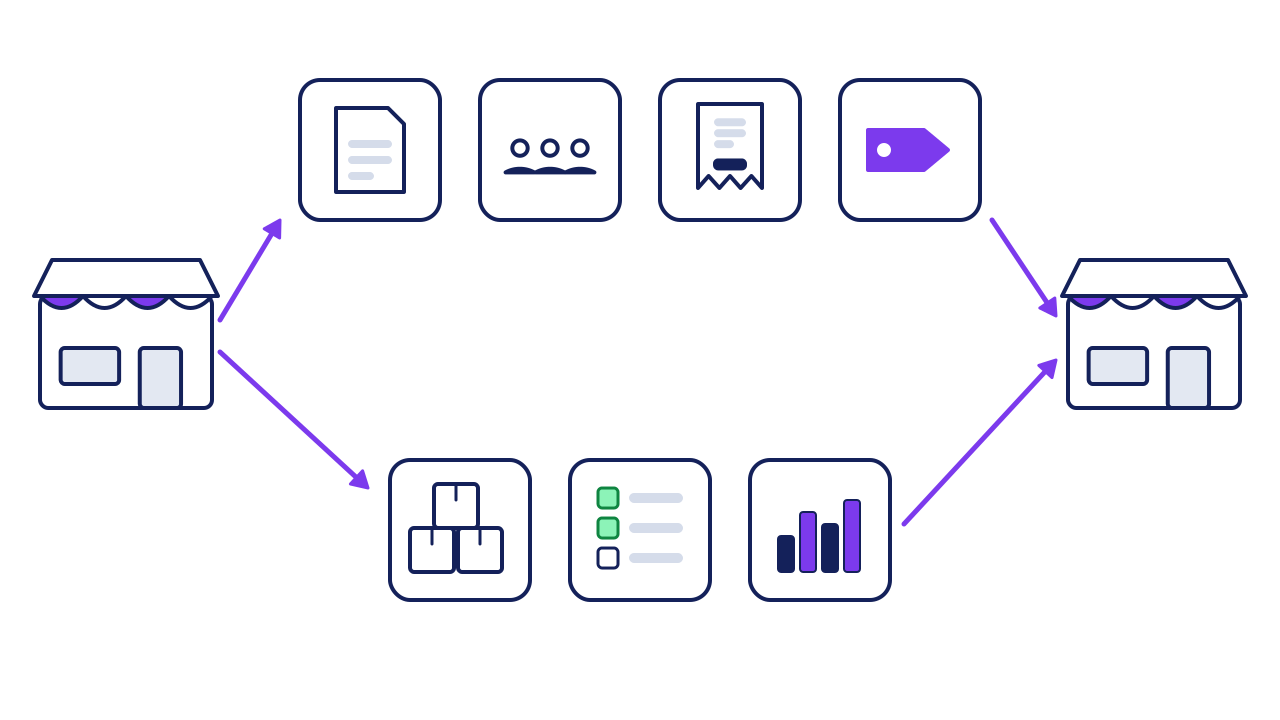
- Written how-tos: a new person can do it your way.
- One customer list: who buys, at which location.
- One way to take orders: work won per location.
- Location tags in the books: profit per location.
- Stock counts per location: what is where.
- Training checklist: a hire can work alone.
- Daily numbers report: both locations, side by side.
- Arrows: each system is set up at location 1, then copied to location 2.
Worked example: a bakery scores itself
A bakery owner scores each system from 0 to 2.
0: only in someone's head.
1: written or set up, but only location 1 uses it.
2: written, shared, and used every week.
| # | System | Score | Fix |
|---|---|---|---|
| 1 | Written how-tos | 1 | Share the folder |
| 2 | One customer list | 2 | None |
| 3 | One way to take orders | 1 | Add "Which location?" |
| 4 | Location tags in the books | 0 | Turn on tags, 30 minutes |
| 5 | Stock counts | 1 | One count sheet for both |
| 6 | Training checklist | 0 | Write it, about 2 hours |
| 7 | Daily numbers report | 1 | Add location 2's column |
1 + 2 + 1 + 0 + 1 + 0 + 1 = 6 of 14. The two 0s come first: books and training. Our rule of thumb, not a study: fix every 0 before you sign the lease, and every 1 before opening day.
add the 7 scores = readiness, out of 14
Your turn: score your 7
| # | System | Score (0, 1 or 2) | Fix |
|---|---|---|---|
| 1 | Written how-tos | ||
| 2 | One customer list | ||
| 3 | One way to take orders | ||
| 4 | Location tags in the books | ||
| 5 | Stock counts | ||
| 6 | Training checklist | ||
| 7 | Daily numbers report |
If it goes wrong
Common mistakes, and the fix for each.
-
You become the system.
Spot itlocation 2 calls you for answers every day.
Fix itturn each call into a written step (system 1). Know-how fades fast, as the pizza store study found.
-
Two customer lists.
Spot itthe same customer twice, with different phone numbers.
Fix itmerge into one list with a location field (system 2).
-
Books you can't split.
Spot ityour profit report shows one business.
Fix itturn on location tags before the first sale, then run profit and loss by location (QuickBooks).
Check your work
Do-confirm checklist. Do the work, then confirm each line.
Answer from memory, then open the answers.
In the pizza store study, when did know-how move between stores?
Show the answer
Between stores with the same owner, not between different owners.
What is the red line for training?
Show the answer
Nobody works alone before the checklist is signed.
When this does not apply
- You are buying a franchise. The franchisor supplies most of these. Ask to see its operating manual before you buy.
- Location 2 is a different kind of business. Copy only systems 4 and 7. The rest will differ.
- A pop-up or a season-only stand. Systems 3, 4 and 7 are enough.
Your next step
score your 7 today, in 30 minutes. Then fix the first 0 on the list before Friday.
Go deeper: why write it down
Show the detail
The pizza store study. Researchers tracked 36 pizza stores in Pennsylvania, with 10 different owners, weekly, for about 18 months (Darr, Argote and Epple, 1995).
| What they found | How to use it |
|---|---|
| Costs per unit fell as stores gained experience | Location 1's lessons are worth copying |
| Know-how "is found to depreciate rapidly" | Write it down before it fades |
| It moved between stores with the same owner, not between owners | In our view, shared systems help carry it |
It is one study, from 1995, of one kind of store. It did not measure software. The direction still fits: lessons fade unless something holds them.
The manual test. Franchise rules make a franchisor list the table of contents of its operating manual, with the pages on each subject (16 CFR 436.5(k)(6)). It must also say which computer systems owners must use, and whether it can see their data (436.5(k)(5)). Could you write that table of contents for your business today? If not, start with system 1.
Read next
Sources
- Darr, Argote and Epple, "The Acquisition, Transfer, and Depreciation of Knowledge in Service Organizations: Productivity in Franchises," Management Science 41(11), 1995, pages 1750 to 1762. Abstract. econpapers.repec.org/RePEc:inm:ormnsc:v:41:y:1995:i:11:p:1750-1762
- US Code of Federal Regulations, 16 CFR 436.5, Item 11, paragraphs (k)(5) and (k)(6). law.cornell.edu/cfr/text/16/436.5
- Intuit, "Set up and use location tracking," QuickBooks help. quickbooks.intuit.com/learn-support/en-us/help-article/track-location/set-use-location-tracking/L2raFkEBC_US_en_US
- Intuit, "Run a Profit and Loss report by bank account," QuickBooks help (covers Profit and Loss by Location). quickbooks.intuit.com/learn-support/en-us/help-article/profit-loss-reports/run-profit-loss-report-bank-account-quickbooks/L7LG5aAyC_US_en_US
About this guide
- How it was made
- drafted with AI from the 4 public sources above. No Paper St client notes were used.
- How it was checked
- each number against its source, by a checker separate from the drafter, before release.
- Who published it
- Joseph Gomez Salazar. Published Oct 11, 2026. Last updated: not yet.