
What should you automate first in a small business?
By Joseph Gomez Salazar · Paper StPublished Drafted with AI from the public sources listed below. Published by Joseph Gomez Salazar. How we make these guides
Automate first a task you repeat often, with the same steps each time, that is cheap to get wrong. In our view, for most owners that is the first reply to a new lead, or invoice reminders. A daily task that you cut by 5 minutes is worth up to 6 full days of setup over 5 years (xkcd 1205).
You'll be able to test any task, price its payback, pick a first task, and know when to wait.
- You'll get
- 3 tests, a payback formula, 7 usual first tasks and a 1-week tally sheet.
- Expect
- about 6 minutes to read and 1 week of tallying.
- For
- owners who do the admin themselves. Not for: teams that already run a list of automations.
- Do you know which tasks you repeat every week?
- Could you write the steps of each on one card?
- Do you know how long the setup would take?
3 yeses? Skip to "The 7 tasks, side by side". Any no? Start with "The 3 tests".
The 3 tests
A task goes first only if it passes all 3 (our view).
1. It repeats every week or more. Rare tasks pay back slowly. 2. The steps are the same every time. If you decide something new each time, a tool cannot. 3. A mistake is cheap and easy to spot. Start where an error costs a redo, not a customer.
Then price it:
minutes saved each time × times a week × 50 weeks ÷ 60 = hours saved a year
setup hours ÷ hours saved a week = payback in weeks
The 7 usual first tasks
In our view, these 7 pass all 3 tests for most service businesses. They are in no order. Your week decides which comes first.
1The first reply to a new lead
- What it tells you
- the lead knows you got their message.
- Where it lives
- your phone, form and inbox.
- How often
- every lead.
- The red line
- the reply must name a time. Firms that tried within an hour were nearly 7 times as likely to reach a decision maker (HBR, 2011). That is against firms that tried an hour later.
- Example
- a missed call gets a text: "I'll call you by 2 pm."
2Invoice reminders
- What it tells you
- who owes you, without you chasing.
- Where it lives
- your invoicing or accounting app.
- How often
- every open invoice, on a set day.
- The red line
- a person handles any reply that disputes the bill.
- Example
- a polite note 3 days before the due date, then 1 day after.
3Booking confirmations and reminders
- What it tells you
- the customer knows when you are coming.
- Where it lives
- your calendar or booking app.
- How often
- every booking.
- The red line
- every reminder has a way to move the time.
- Example
- a text the day before: "See you at 9 am. Need a new time? [link]"
4Copying a new customer into your other apps
- What it tells you
- every app has the same name, phone and address.
- Where it lives
- between your lead list, calendar and invoicing app.
- How often
- every new customer.
- The red line
- one app is the master. Edits happen there only.
- Example
- a new booking creates the customer in your invoicing app, with no typing.
5Review requests after a finished job
- What it tells you
- who was asked, and who answered.
- Where it lives
- your job list and a text or email tool.
- How often
- every finished job.
- The red line
- ask everyone. Google's rules ban asking only happy customers, and ban rewards for reviews (Google Maps content policy).
- Example
- a text 1 day after the job, with the review link.
6The weekly numbers report
- What it tells you
- leads, jobs done and money owed, on one page.
- Where it lives
- pulled from each app into one sheet or email.
- How often
- every Monday.
- The red line
- the tool collects the numbers. A person reads them and decides.
- Example
- a Monday 7 am email with 3 numbers and last week's 3 beside them.
7A weekly copy of your customer list
- What it tells you
- you own your data, even if an app fails.
- Where it lives
- exported from your main app to a folder you control.
- How often
- every week.
- The red line
- open one copy each month and count the rows.
- Example
- a Sunday export lands in your own cloud folder, named by date.
The 7 tasks, side by side
The first-task table.
| Task | Repeats weekly | Same steps | Cheap if wrong | The red line |
|---|---|---|---|---|
| 1. First reply to a lead | Yes | Yes | Yes | Name a time |
| 2. Invoice reminders | Yes | Yes | Yes | A person handles disputes |
| 3. Booking reminders | Yes | Yes | Yes | A way to move the time |
| 4. Copy new customers | Yes | Yes | Yes, if one app is master | Edit in one place |
| 5. Review requests | Yes | Yes | Yes | Ask everyone, no rewards |
| 6. Weekly report | Yes | Yes | Yes | A person decides |
| 7. Weekly customer copy | Yes | Yes | Yes | Count the rows monthly |
| Writing quotes (for contrast) | Yes | No | No | Not first: each quote needs judgment |
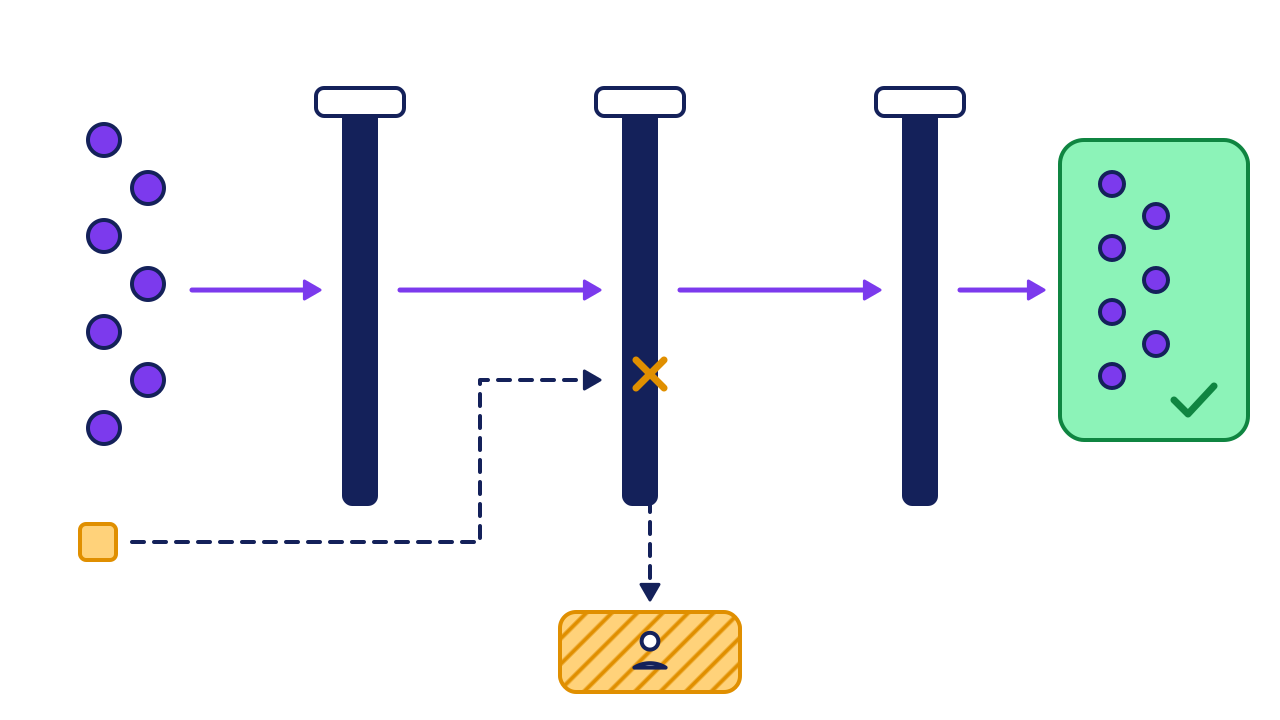
- Repeats weekly: every task passes.
- Same steps: quotes fail. Each one is different.
- Cheap if wrong: quotes fail too. A wrong price costs a job.
- Automate: the 7 tasks that pass all 3 gates.
- Keep with a person: the square, writing quotes.
Worked example: one week, priced
A 4-person cleaning company tallies one week, then prices each task.
| Task | Minutes each | Times a week | Hours saved a week | Setup hours | Payback |
|---|---|---|---|---|---|
| First reply to a lead | 4 | 25 | 1.7 | 3 | 2 weeks |
| Invoice reminders | 10 | 8 | 1.3 | 2 | 2 weeks |
| Copy new customers | 6 | 10 | 1.0 | 4 | 4 weeks |
| Weekly report | 90 | 1 | 1.5 | 8 | 5 weeks |
| Writing quotes | 45 | 6 | 4.5 | none | Fails gate 2 |
What they pick: the first reply to a lead. It pays back in about 2 weeks and saves about 83 hours a year (100 minutes × 50 weeks ÷ 60). Quotes take the most time but fail gate 2, so they stay manual.
Your turn: the 1-week tally
| Task | Minutes each | Times a week | Hours saved a week | Setup hours | Payback |
|---|---|---|---|---|---|
If it goes wrong
Common mistakes, and the fix for each.
-
You automate a messy task.
Spot itthe tool sends the wrong thing, faster.
Fix itdo the task by hand the same way 5 times first, and write the steps down (our view).
-
It fails in silence.
Spot ita customer asks why no reminder came.
Fix itevery automation alerts one named person when it fails.
-
Review requests go only to happy customers.
Spot ita filter picks who gets asked.
Fix itask everyone. Google's policy bans picking (Google Maps content policy).
Check your work
Do-confirm checklist. Do the work, then confirm each line.
Answer from memory, then open the answers.
What are the 3 tests?
Show the answer
It repeats weekly, the steps are the same, and a mistake is cheap.
Why do quotes stay manual, even though they take the most time?
Show the answer
Each quote needs judgment, so it fails the same-steps test.
When not to automate yet
- The task is under 1 hour a week in all. In our view, the setup and upkeep may cost more than it saves.
- You are still changing how you do it. Settle the steps first, then automate.
- Your apps cannot connect. If a link between them costs more a year than the hours saved are worth, wait.
Your next step
keep the 1-week tally. Add a line each time you do a repeat task. On Friday, run the 3 tests and price the top 3.
Go deeper: the payback table
Show the detail
A well-known chart does the math over 5 years (xkcd 1205, "Is It Worth the Time?"). It shows how long you can spend making a task faster before it stops paying. A few rows:
| Time saved each time | Done 5 times a day | Done daily | Done weekly |
|---|---|---|---|
| 1 minute | 6 days | 1 day | 4 hours |
| 5 minutes | 4 weeks | 6 days | 21 hours |
| 30 minutes | 6 months | 5 weeks | 5 days |
How to read it: saving 5 minutes on a daily task is worth up to 6 full days of setup over 5 years (xkcd 1205). Upkeep counts too, so leave room.
Read next
Sources
- Randall Munroe, "Is It Worth the Time?", xkcd 1205. xkcd.com/1205/
- Oldroyd, McElheran and Elkington, "The Short Life of Online Sales Leads," Harvard Business Review, March 2011. hbr.org/2011/03/the-short-life-of-online-sales-leads
- Google, Maps user contributed content policy, prohibited and restricted content. support.google.com/contributionpolicy/answer/7400114?hl=en
About this guide
- How it was made
- drafted with AI from the 3 public sources above. No Paper St client notes were used.
- How it was checked
- each number against its source, by a checker separate from the drafter, before release.
- Who published it
- Joseph Gomez Salazar. Published Oct 12, 2026. Last updated: not yet.