
How to use AI in a small business: start with what it can see
By Joseph Gomez Salazar · Paper StPublished Drafted with AI from the public sources listed below. Published by Joseph Gomez Salazar. How we make these guides
Start with one weekly task whose facts already sit in an app AI can read, and check every result before a customer sees it. Then run a 2-week trial and count the minutes. Most small firms have not started: under 20% of firms with 4 or fewer staff used AI in early 2026 (Census, 2026).
You'll be able to list the tasks AI could take and score each with the reach test. Then run a 2-week trial, and set what AI must never say.
- You'll get
- the reach test, a brief to copy, a never-say list, and a 7-line checklist.
- Expect
- about 7 minutes to read, 30 minutes to score, then a 2-week trial.
- For
- owners who want AI to save hours, not add one more app to watch. Not for: businesses already running AI on live customer work.
- Can you name a task that takes over 1 hour a week and goes the same way each time?
- Are that task's facts in an app, not in your head or your texts?
- Do you know what your AI tool does with what you paste into it?
3 yeses? Skip to Phase 2. Any no? Start with Phase 1.
Phase 1: find the task
Phase 1 of 3 · today · 30 minutes
-
List 10 tasks you repeat every week.
Write each as a verb and a thing, with the hours it takes.
Example, made-up numberswrite quotes, 4 hours. Answer the same 5 questions, 3 hours. Chase unpaid invoices, 2 hours.
Done when10 tasks, each with its hours.
-
Score each task with the reach test.
Ask 3 yes or no questions. Are its facts in an app? Can the AI read that app, by a connection or an export? Can a person check the result first?
Examplequotes. Prices sit in a spreadsheet, it exports, and you read each quote first. 3 of 3.
Done whenevery task has a score from 0 to 3.
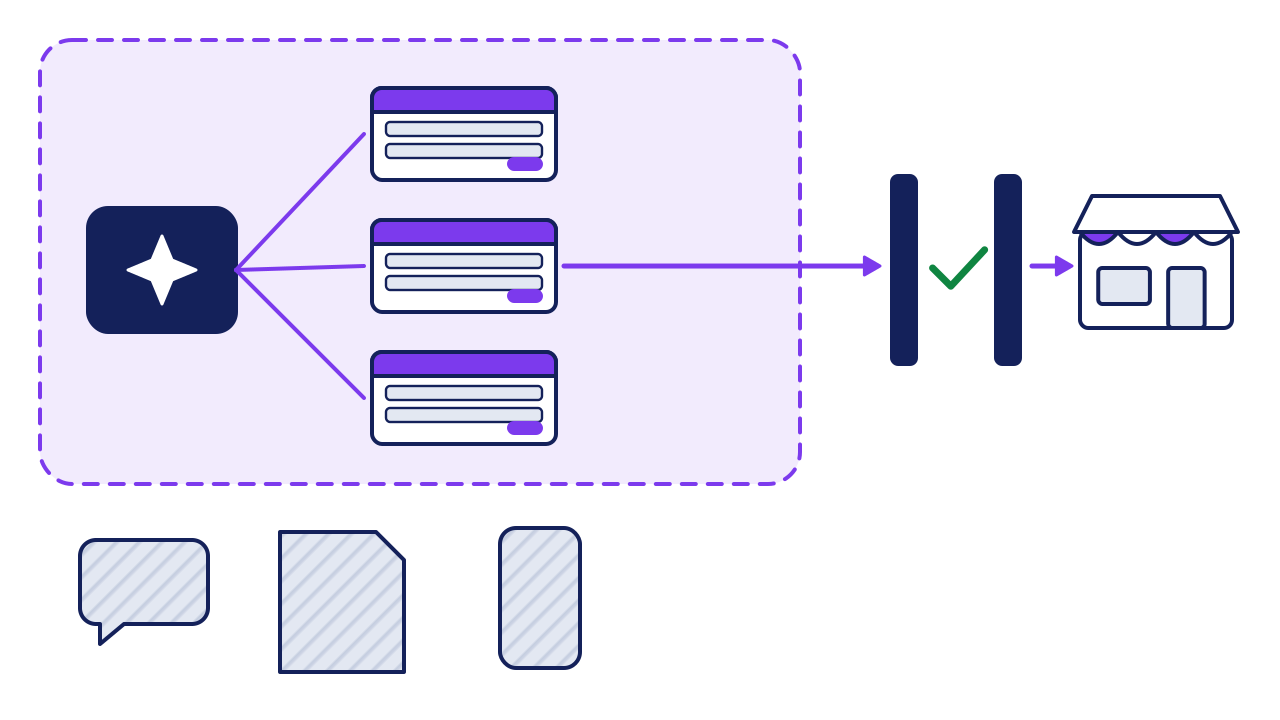
- Inside the light: apps the AI can read, by a connection or an export. Start here.
- Outside the light: your head, paper, and texts on your phone. Move a task's facts into an app first.
- The gate: a person checks the result before any customer sees it.
-
Pick the 3-of-3 task that takes the most hours.
If none scores 3, first move one task's facts into an app. AI needs that. To rank tasks by payback, see what to automate first.
Example"answer the same 5 questions" scores 1, because the answers live in your head. Write them down first.
Done whenone task is picked, with its weekly hours.
Phase 2: run a 2-week trial
Phase 2 of 3 · the next 2 weeks · 20 minutes a day
-
Check where your data goes before you paste anything.
Some AI plans may train on your chats unless you switch it off. OpenAI says so for ChatGPT, with a setting called "Improve the model for everyone" (OpenAI Help).
Exampleturn that setting off. On a business plan, read its data page before you paste. Never paste passwords or card numbers.
Done whenyou know where your pasted data goes.
-
Write the task as a short brief the AI gets every time.
Say the job, the facts it may use, the format, and what it must never do.
Examplethe brief to copy below.
Done whenthe brief fits on one screen and is saved.
-
Time it both ways, and count the fixes.
Do the task with AI and check every result. In one study of 5,179 support agents, an AI helper raised issues solved per hour by 14% (NBER). Your own count is what matters.
Example, made-up numbersquotes took 20 minutes by hand, and 8 with AI plus 4 to check.
Done whenyou have 2 weeks of minutes and fixes.
Change the words in brackets. Keep the last 2 lines.
The job
"Draft a quote for [job] from the price sheet I paste below."
The facts
"Use only the prices and items on the sheet."
The format
"Items, quantity, price, total. Plain words, under 150 words."
When a fact is missing
"Write ASK OWNER in its place. Never guess."
Never
"Never promise a date, a discount or a refund."
Phase 3: set the rules, then add the next task
Phase 3 of 3 · after the trial · 30 minutes
-
Write the never-say list before AI talks to customers.
A business can be held to what its chatbot says. A tribunal held an airline liable for its chatbot's wrong fare advice (the ruling, via McCarthy Tetrault). Full list: how to use AI to follow up with leads.
Example"Never quote a price. Say: I'll have [name] send your quote today."
Done whenthe list sits in every brief.
-
Keep a person on anything that leaves the building.
For the first month, a person reads every message, quote or post before it goes out.
ExampleAI drafts replies to reviews. You approve each one in under a minute.
Done whennothing reaches a customer unread.
-
Add the next task only when the first one pays.
Keep it if the trial saved time with few fixes. Then go back to your list and your scores.
Example, made-up numbersquotes saved about 1.6 hours a week, so the next task is the 5 questions, now written down.
Done whenthe next task is picked, and scores 3 of 3.
Worked example: one week, scored
A small cleaning company scores 5 of its weekly tasks.
| Task | Hours a week | Facts in an app? | AI can read it? | Checked first? | Score |
|---|---|---|---|---|---|
| Write quotes | 4 | yes, price sheet | yes, export | yes | 3 |
| Schedule the crew | 3 | yes, booking app | no connection | yes | 2 |
| Answer the same questions | 3 | no, in my head | no | yes | 1 |
| Chase unpaid invoices | 2 | yes, accounting app | yes, export | yes | 3 |
| Post on social media | 2 | partly, photos on a phone | no | yes | 1 |
What they pick: quotes. It scores 3 of 3 and takes the most hours. Invoices come next.
What did the trial save? Use your own numbers:
12 quotes × 8 minutes = 96 minutes a week
It is an estimate from 2 weeks. Check it again after a month.
tasks a week × minutes saved on each, after checking = minutes saved a week
Your turn: score your week
| Task | Hours a week | Facts in an app? | AI can read it? | Checked first? | Score |
|---|---|---|---|---|---|
| Task 1 | |||||
| Task 2 | |||||
| Task 3 | |||||
| Task 4 | |||||
| Task 5 |
If it goes wrong
Common mistakes, and the fix for each.
-
The AI makes up a fact.
Spot ita price, date or rule you never gave it.
Fix ittell it to use only the facts in the brief, and to write ASK OWNER when one is missing (step 5).
-
The time moves to checking.
Spot itcheck minutes climb, and fixes pile up.
Fix itcount checking time in the trial (step 6). Stop if the total is not lower.
-
You picked a task AI can't reach.
Spot ityou spend the trial copying facts into the chat.
Fix itgo back to step 3. Move that task's facts into an app first. This fix is our view.
Check your work
Do-confirm checklist. Do the work, then confirm each line.
Answer from memory, then open the answers.
What are the 3 questions in the reach test?
Show the answer
Are its facts in an app? Can the AI read that app? Can a person check the result before a customer sees it?
When do you add a second task?
Show the answer
When the first one saved time, with few fixes, counting the checking.
When this does not apply
- Tasks that need judgment every time, like pricing an odd job. Keep those yourself.
- Tasks under 1 hour a week. The trial costs more than it saves.
- Customer data with rules attached. Check what your contracts and local privacy rules allow before any of it goes near an AI tool.
Your next step
list 10 tasks and score them today. It takes 30 minutes. Pick the top one, and start the 2-week trial on Monday.
Go deeper: what the studies say, and what they don't
Show the detail
Why reach comes first. An AI tool can only use the facts it is given or can read. A task whose facts live in your head costs you the typing every time. That is why the test asks about the app before the AI.
| The claim | Where it comes from | What it measured | How to use it |
|---|---|---|---|
| "Most small firms don't use AI yet" | US Census Bureau, May 2026 | From December 2025 to May 2026, 17% to 20% of US firms used AI. Under 20% of firms with 4 or fewer staff did. 37% of firms with 250 or more did | Solid. A national Census survey of businesses |
| "AI makes staff 14% faster" | Brynjolfsson, Li and Raymond, NBER; published in the Quarterly Journal of Economics, 2025 | 5,179 support agents at one firm. Issues solved per hour rose 14% on average and 34% for new and low-skilled staff, with little change for the most skilled | Real, but one job at one firm. Do not expect 14% on your task. Run your own trial |
| "The chatbot said it, so it's not on us" | Moffatt v. Air Canada, 2024 BCCRT 149 | The airline argued it was not liable for what its chatbot said. The tribunal said the airline is responsible for all the information on its website | One Canadian small-claims ruling. The lesson travels: you own what your AI says |
The numbers you will see, checked.
Two traps to avoid:
1. "Hours saved" surveys are often run by AI sellers. Trust your own 2-week count over any survey number. 2. A demo is not a trial. A tool that shines on a sample may stumble on your real prices and names. Test it on your own work.
Read next
Sources
- US Census Bureau, "Large Firms With at Least 20 Employees Biggest AI Users", Business Trends and Outlook Survey, 26 May 2026. census.gov/library/stories/2026/05/ai-use-businesses.html
- Brynjolfsson, Li and Raymond, "Generative AI at Work", NBER working paper 31161. Abstract. nber.org/papers/w31161
- The same paper, Quarterly Journal of Economics 140(2), 2025. academic.oup.com/qje/article/140/2/889/7990658
- OpenAI Help Center, "Data controls in ChatGPT" (the "Improve the model for everyone" setting). help.openai.com/en/articles/7730893-data-controls-faq
- Moffatt v. Air Canada, 2024 BCCRT 149, British Columbia Civil Resolution Tribunal, February 2024. canlii.org/en/bc/bccrt/doc/2024/2024bccrt149/2024bccrt149.html
- McCarthy Tetrault, "Moffatt v. Air Canada: A Misrepresentation by an AI Chatbot" (quotes the ruling). mccarthy.ca/en/insights/blogs/techlex/moffatt-v-air-canada-misrepresentation-ai-chatbot
About this guide
- How it was made
- drafted with AI from the 6 public sources above. No Paper St client notes were used.
- How it was checked
- each number against its source, by a checker separate from the drafter, before release. Two pages block our tools. The ChatGPT setting was checked from OpenAI's own help text in search results. The tribunal ruling was checked from a full copy of the decision and published summaries of it.
- Who published it
- Joseph Gomez Salazar. Published Oct 9, 2026. Last updated: not yet.