
When should you stop running the business on spreadsheets?
By Joseph Gomez Salazar · Paper StPublished Drafted with AI from the public sources listed below. Published by Joseph Gomez Salazar. How we make these guides
Switch when the sheet has become a shared system: in our view, when 4 or more of the 7 signs below are true. With 2 or 3, fix the sheet first. Row limits are rarely the reason. Excel holds 1,048,576 rows (Microsoft). People, copies and retyping break it much sooner.
You'll be able to score your sheet, pick keep, fix or switch, and put a yearly cost on the sheet.
- You'll get
- a 7-sign score card, a fix-it-first list and a cost sum.
- Expect
- about 6 minutes to read and 5 minutes to score.
- For
- owners whose team works from a shared spreadsheet. Not for: one person keeping their own notes.
- Do 2 or more people type into the same sheet each week?
- Do you retype numbers from another app into it?
- Has a wrong number in it ever cost you money?
All no? Keep your sheet, and read "When a spreadsheet is still right". Any yes? Score your sheet below.
The 7 signs
Each sign is something you can see in the sheet or the week. They come from what breaks first: shared editing, copying, history, action and access. Tick each one that is true today.
1People keep their own copies
- Tells you
- the sheet is now a shared system with no rules for who edits what.
- Where you see it
- files named "final", "v3" or "copy of".
- How often
- check today, then monthly.
- Red line
- 2 copies in use for the same job.
- Example
- the office has "Jobs 2026", the crew lead has "Jobs 2026 (Sam)". They disagree on 3 start dates.
2You retype numbers from another app
- Tells you
- every retyped cell is a fresh chance for an error. The more careful audits of real spreadsheets found errors in at least 86% of those checked (Panko, 2000).
- Where you see it
- a tab you fill by hand from invoices or bookings.
- How often
- count one week.
- Red line
- more than 1 hour a week of retyping.
- Example
- 40 invoice totals copied every Friday.
3Nobody can say who changed a number
- Tells you
- you have no trail when money is at stake.
- Where you see it
- right-click a cell, then "Show edit history". It misses added or deleted rows and changes made by formulas (Google).
- How often
- each time a number looks wrong.
- Red line
- a number that matters changed, and nobody knows who changed it.
- Example
- a price dropped from $450 to $45 and no one knows when.
4The sheet needs to do things, not just hold them
- Tells you
- you want reminders, handoffs or messages. A sheet waits for you.
- Where you see it
- follow-ups that live in someone's head. Some work accounts can email you when a cell changes (Google). A sheet does not text a customer on its own.
- How often
- count missed follow-ups for one month.
- Red line
- one missed follow-up that lost a job.
- Example
- a quote marked "sent" with no one set to chase it.
5Only one person understands it
- Tells you
- the business stops when that person is out.
- Where you see it
- formulas nobody else will touch.
- How often
- test it once a quarter.
- Red line
- nobody else can run the weekly totals.
- Example
- the owner's partner keeps the pricing tab. They go on holiday, and quotes stop for a week.
6People need part of it, not all of it
- Tells you
- you need access by role. Protecting a range stops edits, not viewing. People who can view can still copy and export it, and unhide hidden tabs (Google).
- How often
- check each time someone joins or leaves.
- Red line
- pay rates or margins in a file the whole team can open.
- Example
- a crew lead needs today's jobs, and sees every price.
7Keeping it tidy takes hours every week
- Tells you
- the sheet now has a hidden wage.
- Where you see it
- time spent fixing formats, merging copies and chasing blanks.
- How often
- track one normal week.
- Red line
- your own sum in the worked example comes out higher than a year of the software you would use.
- Example
- 3 hours every Monday to tidy the job list.
Score your sheet
Score card. Tick each true sign, then read your band.
| # | Sign | True today? |
|---|---|---|
| 1 | People keep their own copies | ☐ |
| 2 | You retype numbers from another app | ☐ |
| 3 | Nobody can say who changed a number | ☐ |
| 4 | The sheet needs to do things | ☐ |
| 5 | Only one person understands it | ☐ |
| 6 | People need part of it, not all of it | ☐ |
| 7 | Keeping it tidy takes hours every week | ☐ |
| Ticks | Band | What to do |
|---|---|---|
| 0 to 1 | Keep | Keep the sheet. Score it again in 3 months |
| 2 to 3 | Fix first | Run the fix-it-first list below this month |
| 4 or more | Switch | Plan the switch. Fix-it-first still helps you move clean data |
The bands are our view, not a study. No source sets a number of signs.
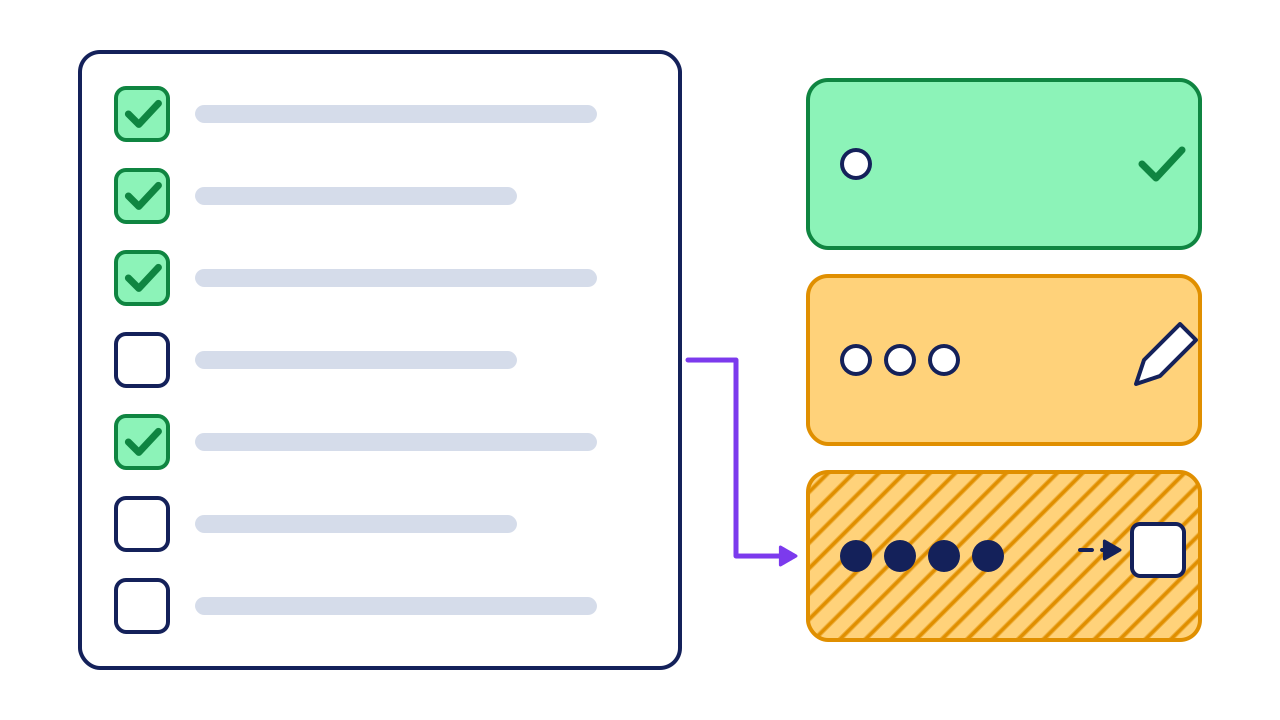
- The 7 signs: one row each. Tick the ones true today.
- Your ticks: 4 here, so this sheet lands in band 3.
- The bands: keep (a tick), fix first (a pencil), and switch (an arrow, hatched).
Do these before you buy anything.
One file, one owner
Delete or lock the copies.
Dropdowns for repeated words
(status, location, name). In Sheets: Data, then Data validation (Google).
A change log tab
date, who, what changed, why.
One row per job or order,
never merged cells.
A second person runs it
for one week.
Worked example: one sheet, scored and priced
A 6-person landscaping company runs jobs, crews and invoices from one sheet.
| # | Sign | True? | What they saw |
|---|---|---|---|
| 1 | Own copies | Yes | The crew lead's copy |
| 2 | Retyping | Yes | 40 invoices a week, by hand |
| 3 | Who changed it | No | One editor on prices |
| 4 | Needs to act | Yes | Quotes never chased |
| 5 | One person | Yes | Only the owner knows the formulas |
| 6 | Part, not all | No | Crew never open it |
| 7 | Upkeep hours | Yes | 4 hours a week |
Score: 5 of 7. Band: switch.
What the sheet costs a year. Use your own numbers:
4 hours × $30 × 52 = $6,240 a year. Compare it with a year of the software you would use. This sum leaves out errors and lost jobs, so it is the low end.
hours a week of upkeep × hourly cost × 52 = yearly cost of the sheet
Your turn: score and price your sheet
| Line | Your number |
|---|---|
| Signs true today (0 to 7) | |
| Your band | |
| Hours a week of upkeep | |
| Hourly cost of whoever does it | |
| Yearly cost (hours × cost × 52) | |
| A year of the software you would use |
If it goes wrong
Common mistakes, and the fix for each.
-
You switch, and the mess moves with you.
Spot itthe new app fills with the same duplicates.
Fix itrun fix-it-first before you import.
-
Two systems run side by side for months.
Spot itstaff still update the old sheet "just in case".
Fix itpick a cut-off date, then make the sheet read-only.
-
You buy for the rare case.
Spot itthe demo you liked most shows features you did not tick.
Fix itbuy only for your ticked signs. That part is our view.
Check your work
Do-confirm checklist. Do the work, then confirm each line.
Answer from memory, then open the answers.
How many signs mean "plan the switch"?
Show the answer
4 or more. With 2 or 3, fix the sheet first.
Does protecting a range keep people from seeing it?
Show the answer
No. It stops edits only. Viewers can still copy and export.
When a spreadsheet is still right
- One person, one purpose. A sheet you alone use to think through prices is a tool, not a system.
- The process itself is unclear. Software copies your process. Write it down first.
- A one-off job. A quote builder you use twice a year does not need an app.
Your next step
score your sheet today. It takes 5 minutes. Then time one normal week of upkeep, and fill in the cost sum on Friday.
Go deeper: the real limits of a spreadsheet
Show the detail
The size limits are far away. Most small businesses never reach them.
| Tool | Limit | Source |
|---|---|---|
| Excel | 1,048,576 rows by 16,384 columns on one sheet | Microsoft |
| Google Sheets | Up to 20 million cells or 100 MB |
Errors come early, even in small sheets. In lab tests, 51% of spreadsheets had errors, though most had only 25 to 50 cells (Panko, 2000). Audits of big real sheets found 1.1% to 2.5% of cells held an original error (Panko, 2000). Those studies are old. The point still holds: checking by eye misses a lot.
Read next
Sources
- Panko, "Spreadsheet Errors: What We Know. What We Think We Can Do," EuSpRIG symposium, 2000. arxiv.org/abs/0802.3457
- Google, "Find what's changed in a file," Docs Editors Help. support.google.com/docs/answer/190843?hl=en&co=GENIE.Platform%3DDesktop
- Google, "Protect, hide and edit sheets," Docs Editors Help. support.google.com/docs/answer/1218656?hl=en&co=GENIE.Platform%3DDesktop
- Google, "Use conditional notifications," Docs Editors Help. support.google.com/docs/answer/14099459?hl=en
- Google, "Create an in-cell dropdown list," Docs Editors Help. support.google.com/docs/answer/186103?hl=en
- Google, "Files you can store in Google Drive," Drive Help. support.google.com/drive/answer/37603
- Microsoft, "Excel specifications and limits." support.microsoft.com/en-us/office/excel-specifications-and-limits-1672b34d-7043-467e-8e27-269d656771c3
About this guide
- How it was made
- drafted with AI from the 7 public sources above. No Paper St client notes were used.
- How it was checked
- each number against its source, by a checker separate from the drafter, before release.
- Who published it
- Joseph Gomez Salazar. Published Oct 9, 2026. Last updated: not yet.