
How do you track leads from calls, forms and social media in one place?
By Joseph Gomez Salazar · Paper StPublished Drafted with AI from the public sources listed below. Published by Joseph Gomez Salazar. How we make these guides
Keep one lead list, and add every lead to it the moment it arrives, from every door. Tag each door so the source fills in by itself: a tracking number per ad, tags on your links, a hidden field on your form. Then count each door once a week against the list. The gap is your lost leads.
You'll be able to build one list, tag every door, catch leads that never reach the list, and see which source brings paying work.
- You'll get
- an 8-column lead list, a door-tag map, a weekly count check, and a 7-line checklist.
- Expect
- about 7 minutes to read, and about 2 hours to set up.
- For
- owners whose leads come by phone, web form, social messages and email, and who can't say which ad paid. Not for: teams whose sales software already logs every channel.
- Could you show last month's leads, from every channel, in one place?
- Do you know where your last 10 paying customers came from?
- Do leads from ad lead forms reach you the same day?
3 yeses? Skip to "If it goes wrong". Any no? Start with Phase 1.
Phase 1: build the one list
Phase 1 of 3 · today · 30 minutes
-
Make one list with 8 columns.
Date and time, name, contact, door, source, what they want, owner, status. A shared spreadsheet is enough to start.
ExampleTue 9:14 · Dana R. · 555-0142 · call · Google ad · roof repair quote · Sam · new.
Done whenthe list opens on every phone that takes leads.
-
Write down every door a lead can use.
A door is how they reach you. A source is what sent them. Most businesses have more doors than they think.
Examplemain phone, the number on the truck, web form, social messages, email, walk-ins, ad lead forms.
Done wheneach door has a row in the door-tag map further down.
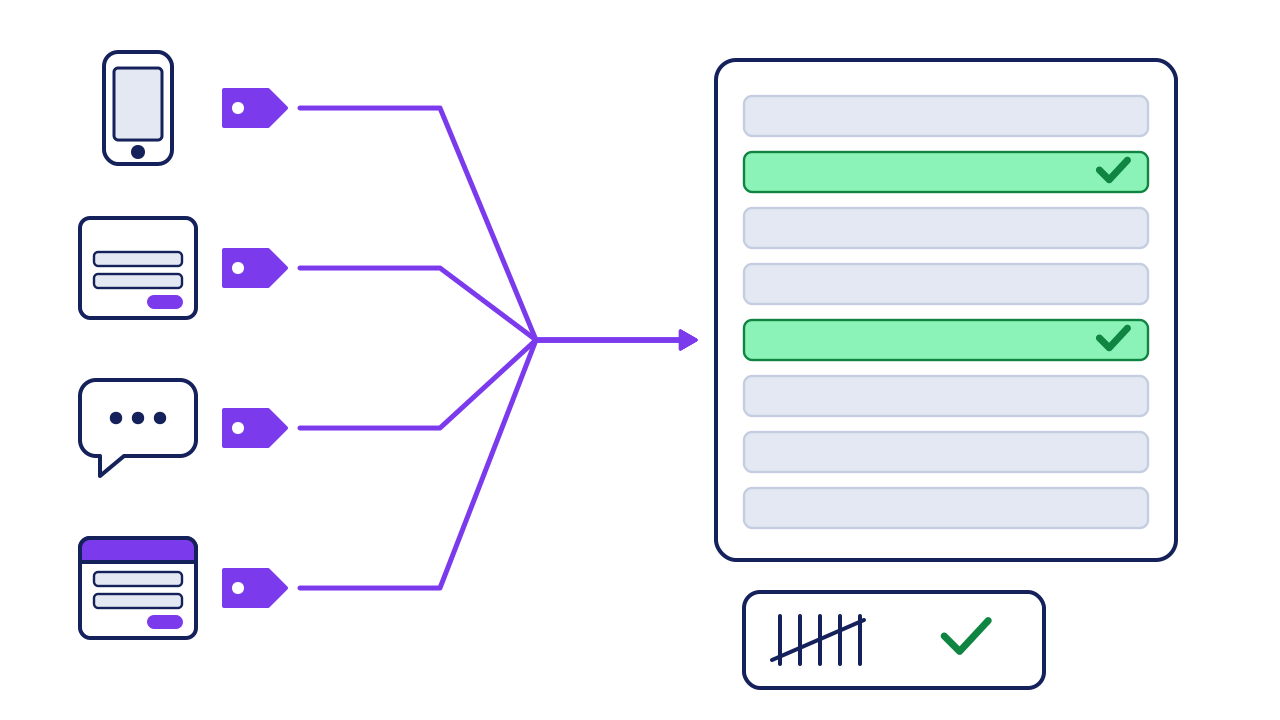
- The doors: phone, web form, social messages, ad lead forms, email and walk-ins.
- The tags: a tracking number, link tags, a hidden form field, or the question "How did you hear about us?"
- One list: every lead, its door and its source, the moment it arrives.
- The weekly count: each door's own count against the list. A gap means a lost lead.
-
Give each status one meaning.
Use 5 words at most, and write what each one means at the top of the list.
Examplenew, contacted, quoted, won, lost. "Contacted" means you spoke, not that you left a voicemail.
Done wheneveryone who adds a lead uses the same 5 words.
Phase 2: tag every door
Phase 2 of 3 · this week · 1 hour
-
Tag every link you post or pay for.
Add source, medium and campaign tags. Google says to always use these 3, and that they are case sensitive (Google Analytics Help). Use lowercase only.
Examplethe spring ad's link gets 3 tags: utm_source=facebook, utm_medium=social and utm_campaign=spring.
Done whenevery ad link and profile link carries tags.
-
Add a hidden source field to your web form.
In our view, many form tools can copy the link tags into a hidden field. Then the source arrives with the lead.
Examplea form from the spring ad lands with "facebook, social, spring" filled in.
Done whena test form shows its source.
-
Give each ad its own phone number.
A tracking number rings your phone and logs which ad the caller saw. Google's own forwarding numbers work only for calls from its ads (Google Ads Help). For a truck or a flyer, use a call-tracking service.
Examplethe truck and flyer numbers ring the same phone, but log as 2 sources.
Done whena test call to each number shows its source.
-
Move ad lead forms into the list every day.
Leads from forms inside ad platforms stay there until you move them. Google says they expire after 60 days (Google Ads Help). Meta allows downloads for 90 days (Meta Business Help).
Exampleconnect the form to your list, or download it each morning.
Done whenyesterday's form leads are in the list.
The door-tag map. Copy it, then add your own doors.
| Door | How the source fills in | Test it by |
|---|---|---|
| Web form | Link tags into a hidden field | Sending a test form |
| Phone, from ads | One tracking number per ad | Calling each number |
| Phone, main line | Ask "How did you hear about us?" | Reading the source column |
| Social messages | Tagged profile link, plus the question in your first reply | Counting new chats |
| Ad lead forms | A connection to the list, or a daily download | Finding yesterday's leads |
| Email and walk-ins | Ask the question | Counting new senders and visitors |
Phase 3: count every door each week
Phase 3 of 3 · every Monday · 15 minutes
-
Ask every new lead one question.
"How did you hear about us?" Write the answer word for word. It catches word of mouth, which no tag can see.
Examplethe tag says "google". The caller says "my neighbor, then I searched". Keep both.
Done whenno row has a blank source.
-
Count each door, then count the list.
Take each door's own count from its app, and set it against the rows for that door.
Example, made-up numbersthe phone log shows 31 calls from new numbers. The list has 24 call rows. 7 went missing.
Done whenevery door matches, or you know why not.
-
Add up won jobs by source, once a month.
Count leads and won jobs for each source. That is the number that says which ad paid.
Examplethe worked example below.
Done wheneach source has leads, won jobs and money won.
Worked example: one month, counted and scored
A small roofing business counts its doors on the first Monday of the month.
| Door | Door's own count | In the list | Missing | Won jobs |
|---|---|---|---|---|
| Phone | 31 | 24 | 7 | 6 |
| Web form | 18 | 18 | 0 | 4 |
| Social messages | 12 | 5 | 7 | 1 |
| Ad lead form | 9 | 9 | 0 | 1 |
What they fix first: social messages. 7 of 12 never reached the list. Then the phone, where 7 missed calls got no row.
What were the missing leads worth? Use your own numbers:
14 leads × 20% × $1,500 = $4,200 a month
It is an estimate. Some missing leads were spam or repeat callers.
leads missing from the list × your close rate × your average job = money at risk
Your turn: this month's door count
| Door | Door's own count | In the list | Missing | Won jobs |
|---|---|---|---|---|
| Phone | ||||
| Web form | ||||
| Social messages | ||||
| Ad lead form | ||||
If it goes wrong
Common mistakes, and the fix for each.
-
The tags split one source in two.
Spot it"Facebook" and "facebook" show as 2 sources, since Google treats them as different (Google Analytics Help).
Fix itlowercase only, from one written tag sheet.
-
Ad form leads sit unseen.
Spot itthe ad account shows leads the list does not.
Fix itconnect or download daily (step 7), before the leads expire.
-
Social messages never become rows.
Spot itthe door count is far above the list count.
Fix itwhoever answers the social inbox adds each new person the same day. This fix is our view.
Check your work
Do-confirm checklist. Do the work, then confirm each line.
Answer from memory, then open the answers.
What is the difference between a door and a source?
Show the answer
A door is how they reached you. A source is what sent them.
How do you find leads that never reached the list?
Show the answer
Count each door in its own app, and set it against the list.
When this does not apply
- A few leads a month. A notebook works. Still keep one, and still ask the question.
- Word of mouth only. Skip the tags. The question does the work.
- Your sales software already logs every door. Skip Phase 1. Run the weekly count anyway, since it finds the doors that software misses.
Your next step
build the list and the door-tag map today. It takes 30 minutes. Then tag one door by Friday, and send a test lead through it.
Go deeper: tags, answers and expiry dates
Show the detail
Why keep both the tag and the answer. A tag records the last click. People often hear of you first, then search later. The answer to "How did you hear about us?" catches the first part. When they disagree, both are true.
| Where the lead waits | How long | Source |
|---|---|---|
| Google Ads lead form | Leads expire after 60 days | Google Ads Help |
| Meta instant form | Downloads for 90 days after a lead fills in the form | Meta Business Help |
How long each platform holds your leads. Checked at each help page on 2026-09-27. Platforms change these, so check again before you rely on them.
Two traps to avoid:
1. A tracking number is only as good as where it is shown. Put your main number on an ad, and those calls log as "main line". 2. Slow follow-up undoes good tracking. In one test of 2,241 US companies, 23% never answered a web lead at all (Harvard Business Review, 2011).
Read next
Sources
- Google Analytics Help, "URL builders: Collect campaign data with custom URLs" (always use utm_source, utm_medium and utm_campaign; values are case sensitive). support.google.com/analytics/answer/10917952
- Google Ads Help, "Google forwarding number". support.google.com/google-ads/answer/2382961
- Google Ads Help, "Download leads" (leads expire after 60 days). support.google.com/google-ads/answer/10089020
- Meta Business Help Center, "About expired leads" (downloads for 90 days). facebook.com/business/help/1526849577619206
- Oldroyd, McElheran and Elkington, "The Short Life of Online Sales Leads," Harvard Business Review, March 2011. hbr.org/2011/03/the-short-life-of-online-sales-leads
About this guide
- How it was made
- drafted with AI from the 5 public sources above. No Paper St client notes were used.
- How it was checked
- each number against its source, by a checker separate from the drafter, before release. Meta's page blocks plain requests, so its 90 days was read on Meta's own page in a browser. The HBR figures were checked for our guide on lead response time.
- Who published it
- Joseph Gomez Salazar. Published Oct 8, 2026. Last updated: not yet.