
How to get two of your apps to share data
By Joseph Gomez Salazar · Paper StPublished Drafted with AI from the public sources listed below. Published by Joseph Gomez Salazar. How we make these guides
Try 4 routes in order: a built-in link, a connector tool, an API, then a file export on a schedule. Stop at the first that works. On the free plans of 2 connector tools, timed checks run every 15 minutes (Zapier, Make). Start one way, and test it before you trust it.
You'll be able to pick the owner app for each record and the cheapest route that works. Then set up a one-way link, test it for duplicates, and keep it running.
- You'll get
- a route chooser, a field map to fill in, and a 3-record test.
- Expect
- about 6 minutes to read, and 1 to 2 hours to set up.
- For
- owners who retype details from one app into another. Not for: live two-way sync of large databases, which is a developer's project.
- Do you know which app holds the right copy of a customer?
- Could you list, field by field, what you retype?
- Have you checked both apps' integrations pages?
3 yeses? Skip to step 4. Any no? Start with Phase 1.
Phase 1: pick your route
Phase 1 of 2 · today · 20 minutes
-
Pick the owner app for each kind of record.
The owner app is where a record is made and corrected. The other app only receives copies.
Examplethe booking app owns customers. The invoicing app receives them.
Done whencustomers, jobs and invoices each have one owner app.
-
Fill in the field map.
Write each field you retype, the app it comes from, the app it goes to, and what starts the copy.
Example"Email: booking to invoicing, when a new customer books."
Done whenevery retyped field has a line.
-
Check the 4 routes in order, and stop at the first that works.
Use the chooser below. Earlier routes are cheaper and break less.
Examplethe booking app lists the invoicing app on its integrations page. That is route 1, and you are done.
Done whenyou have one route number.
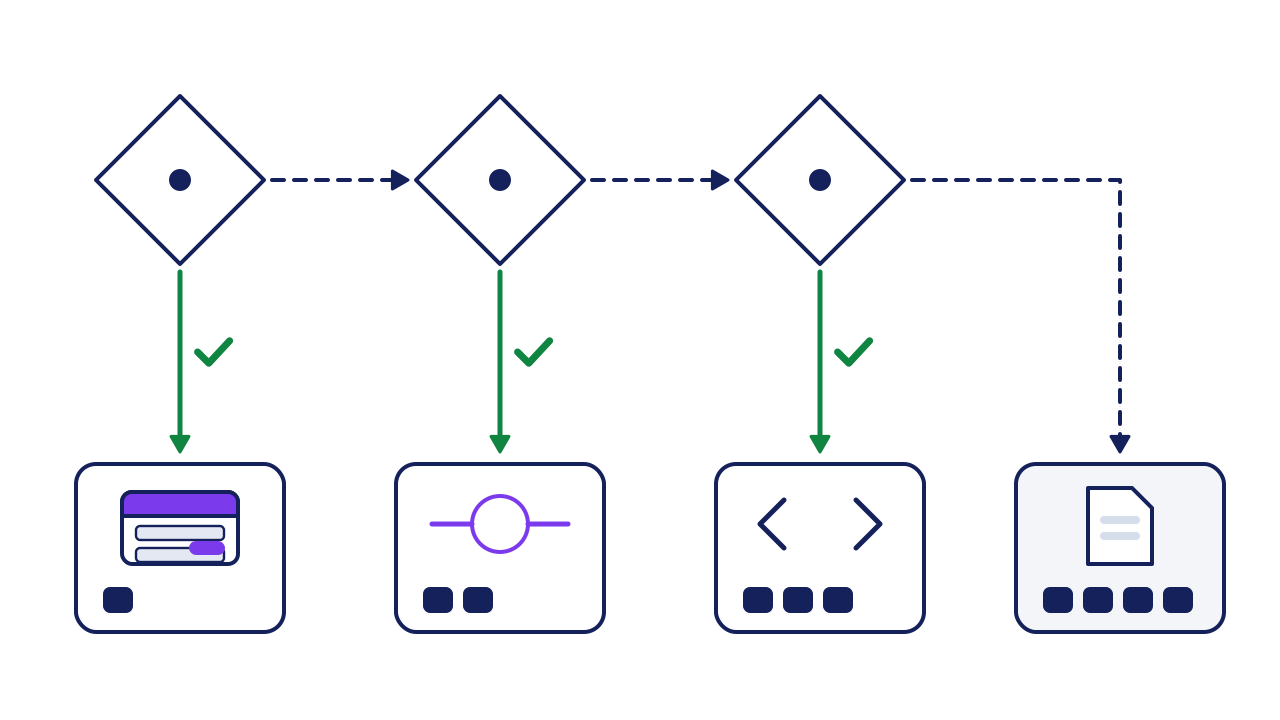
- Q1, is there a built-in link? Look on each app's integrations page. Yes: route 1.
- Q2, are both apps in a connector tool? Search each app's name in the tool's app list. Yes: route 2.
- Q3, does one app have an API? An API is a set of rules that lets one app ask another for data (AWS). Yes: route 3.
- Built-in link: you switch it on.
- Connector tool: a no-code tool copies new records from one app to the other.
- API: a developer builds the link.
- Arrows: a solid green arrow with a tick means yes. A dashed arrow means no.
- Squares under a route: more squares, more work.
- File on a schedule: export a spreadsheet file from one app and import it into the other.
The field map. Copy it into a sheet. One line per field.
| Field | From (owner app) | To | Starts when |
|---|---|---|---|
| Name | |||
| Phone | |||
| Address |
Phase 2: set it up and test it
Phase 2 of 2 · this week · 1 to 2 hours
-
Start one way, with one kind of record.
Copy new customers from the owner app to the other. Leave edits and deletes for later.
Example"New customer in booking, so create a customer in invoicing."
-
Use "find or create", never plain "create".
It looks for the record first and makes one only if it is missing. Zapier's help names this as the fix for loops (Zapier).
Examplematch on the email address, since names repeat.
-
Run the 3-record test.
Add 3 test customers in the owner app, then look in the other.
Examplea normal one, one with no phone, and one who is already in the other app.
Done whenyou see 1 new, 1 new with a blank phone, and no duplicate.
-
Name a person and a weekly check.
In our view, links most often stop when a password or a field changes. Someone opens the run history each week.
Example"Monday 9:00: [Name] opens the run history and fixes any failed runs."
Done whenthe check is on a calendar.
Worked example: bookings into invoicing
A cleaning company retypes each new customer from its booking app into its invoicing app. Neither app lists the other, so Q1 is no. Both are in a connector tool, so it is route 2.
| Test customer | What should happen | What happened | Result |
|---|---|---|---|
| New, all fields | Created in invoicing | Created | Pass |
| New, no phone | Created, phone blank | Stopped with an error | Fix, then re-test |
| Already in invoicing | Found, not created | Found | Pass |
What they fix: they mark phone as optional in the link, then re-run the test. 3 of 3 pass.
Does the free plan cover it? One connector tool counts a task each time an action runs successfully (Zapier). Its free plan allows 100 a month (Zapier).
40 × 1 = 40 tasks. That fits under 100. The time saved at 3 minutes of typing each: 40 × 3 = 2 hours a month.
new customers a month × actions per customer = tasks used
Your turn: the 3-record test
| Test customer | What should happen | What happened | Result |
|---|---|---|---|
| New, all fields | |||
| New, one field empty | |||
| Already in the other app |
If it goes wrong
Common mistakes, and the fix for each.
-
Duplicates pile up.
Spot itthe same customer twice in the receiving app.
Fix itswitch to "find or create", and match on email (step 5).
-
A loop.
Spot itthe same record keeps copying and runs climb.
Fix itgo back to one way only. Zapier's help also suggests a marker field and a filter (Zapier).
-
You expected two-way sync.
Spot itan edit in the receiving app never reaches the owner app.
Fix itmake edits only in the owner app. One major connector tool does not offer two-way sync (Zapier).
-
The link stops and nobody notices.
Spot itthe last good run was days ago.
Fix itthe weekly check (step 7). In our view, a link nobody checks is worse than retyping.
Check your work
Do-confirm checklist. Do the work, then confirm each line.
Answer from memory, then open the answers.
What makes an app the owner app?
Show the answer
It is where the record is made and corrected.
Why "find or create" and not "create"?
Show the answer
It checks for the record first, so no duplicates.
When this does not apply
- The data is stock counts or money, live. A 15-minute gap between checks can sell stock you no longer have (Zapier). Ask for a built-in link, or a developer.
- The data is sensitive and personal. Check what the connector stores, and where, before you link anything.
- One of the apps is on its way out. Don't link an app you are leaving. Export its data first.
Your next step
fill in the field map today, in 20 minutes. Then run through the route chooser, and set up route 1 or 2 for new customers only.
Go deeper: the 4 routes compared
Show the detail
Two kinds of trigger. Some links fire the moment a record is made. Others check on a timer, which is where the 15 minutes comes from (Zapier). Ask which kind yours uses, since it sets how fast the copy shows up.
| Route | Fits when | Who sets it up | How soon data moves | Watch for |
|---|---|---|---|---|
| 1. Built-in link | Each app lists the other | You | Set by the app | It may copy fewer fields than you need |
| 2. Connector tool | Both apps are in the tool | You | Free plans check every 15 minutes (Zapier, Make) | Free limits: 100 tasks a month on Zapier, 1,000 credits a month on Make |
| 3. API | One app has a public API, and no tool covers it | A developer | Set by the build | Someone has to keep it working |
| 4. File on a schedule | Neither app has an API | You | As often as you run it | Columns that don't match between the 2 files |
Read next
Sources
- Amazon Web Services, "What is an API?" aws.amazon.com/what-is/api/
- Zapier, "What's included in Zapier's Free plan," help article, updated 21 August 2026. help.zapier.com/hc/en-us/articles/32337438839565-What-s-included-in-Zapier-s-Free-plan
- Make, "Pricing," Free plan, read 27 September 2026. make.com/en/pricing
- Zapier, "How is task usage measured in Zapier?" help.zapier.com/hc/en-us/articles/8496196837261-How-is-task-usage-measured-in-Zapier
- Zapier, "Does Zapier support two-way syncing?" updated 29 May 2026. help.zapier.com/hc/en-us/articles/8495908569613-Does-Zapier-support-two-way-syncing
- Zapier, "Zap is stuck in a loop," updated 29 May 2026. help.zapier.com/hc/en-us/articles/8496232045453-Zap-is-stuck-in-a-loop
About this guide
- How it was made
- drafted with AI from the 6 public sources above. No Paper St client notes were used.
- How it was checked
- each number against its source, by a checker separate from the drafter, before release. Make's pricing page blocks plain requests, so its free plan was read on that page in a browser.
- Who published it
- Joseph Gomez Salazar. Published Oct 10, 2026. Last updated: not yet.