
How to choose software without adding another app that doesn't talk to the rest
By Joseph Gomez Salazar · Paper StPublished Drafted with AI from the public sources listed below. Published by Joseph Gomez Salazar. How we make these guides
List the apps the new one must share data with before you compare products. Then test that link with your real data during the free trial. In one survey, 60% of software buyers regretted a purchase from the past 12 to 18 months (Capterra, 2024). A test before you pay is cheaper than a switch after.
You'll be able to map the apps you have, write a must-connect list, check a seller's claims, and test the link before you pay.
- You'll get
- a one-page app map, 6 questions to send any seller, and a trial scorecard.
- Expect
- about 6 minutes to read, and about 2 hours to do over one week.
- For
- owners about to add one more app, such as booking, quoting or stock. Not for: teams with an IT person who already runs a software review.
- Do your apps share customer details without retyping?
- Could you name every app you pay for, from memory?
- Did you test your last app with real data before you paid?
3 yeses? Skip to "If it goes wrong". Any no? Start with Phase 1.
Phase 1: map the apps you have
Phase 1 of 2 · today · 30 minutes
-
List every app you pay for.
Open the last 3 months of bank and card statements. Write each app, its monthly cost, and what it holds.
Example"Booking app, $30 a month: names, phone numbers, job times."
Done whenevery repeating charge has a line.
-
Draw an arrow for every copy.
Ask of each app: what do I copy out of it, and where do I type it? Each copy is one arrow. Circle the arrows a person types by hand.
Examplea booking comes in, then you type the customer into the invoicing app. That is one circled arrow.
Done whenevery hand copy has a circled arrow.
-
Write the job and the must-connect list.
One sentence for the job. Then name the 1 to 3 apps the new one must share data with, and which data.
Example"Job: send quotes from my phone. Must connect: invoicing (customer, quote total) and calendar (job date)."
Done whenthe list fits on a sticky note.
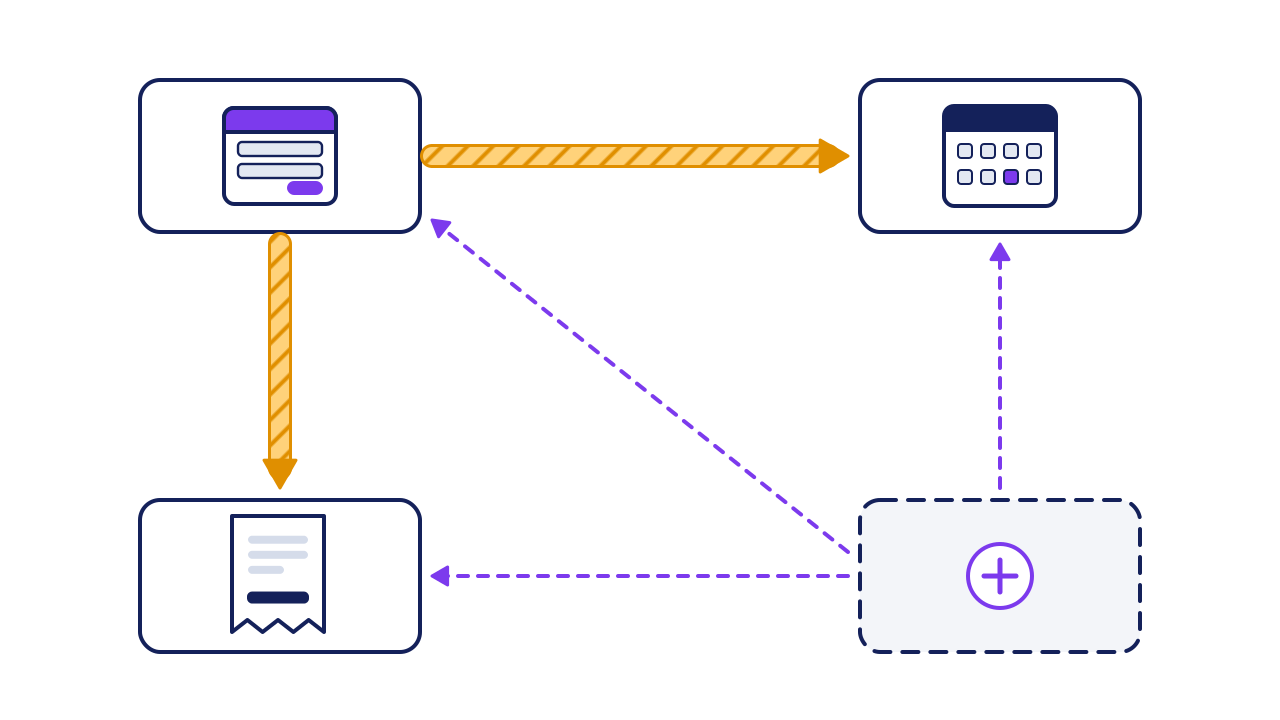
- Booking app: where customers first appear.
- Invoicing app: where the money side lives.
- Calendar: where job dates live.
- The new app (dashed): the one you are choosing.
- Hatched arrow: a customer typed by hand from 1 into box 2. This is what the new setup must remove.
- Hatched arrow: a job date typed by hand from 1 into 3.
- Dashed lines: the links the new app must bring, so the hatched arrows can go.
Phase 2: test before you pay
Phase 2 of 2 · this week · about 90 minutes
-
Check the integrations page for each must-connect app.
Most products list their links on a page called "Integrations" or "Apps". Note how each app connects: built in, through a connector tool, or not at all.
Example"Invoicing: built in. Calendar: only through a connector tool."
-
Send the seller the 6 questions below, in writing.
A written answer can be checked later. A sales call cannot.
Exampleone email to 2 sellers, same 6 questions, a reply asked for by Friday.
-
Run the 1-hour trial test with 3 real records.
Connect the trial to your must-connect apps. Add 3 real customers or jobs, then look for each one in the other app.
Examplea new customer shows up in invoicing with the name, phone and email all correct.
Done when3 of 3 records land whole, with no retyping.
-
Score each finalist and add up the real cost.
Use the scorecard in the worked example. A product that fails a must-connect line is out, whatever else it does well.
ExampleApp B costs more once you add the plan and the connector its link needs.
Paste them into one email.
"Which fields move between your app and [app], and which way?"
"How soon does a change show up in the other app?"
"Is that link in the plan I'm buying, or a higher plan?"
"Do you have a public API?" An API is a documented way for other software to read and write the app's data (AWS).
"Can I export all my data to a spreadsheet file, any time, at no charge?"
"What happens to my data if I cancel?"
Worked example: two apps, scored
A small cleaning company picks a quoting app. It must connect to invoicing and the calendar.
| Check | App A | App B |
|---|---|---|
| Links to invoicing | Built in, both ways | Connector tool only, one way |
| Links to calendar | Built in | Built in |
| How soon a change shows | Seconds | Up to 15 minutes on a free connector plan |
| Link in my plan | Yes | Only on the higher plan |
| Full export to a spreadsheet | Yes | Contacts only |
| Trial test, 3 records | 3 of 3 | 2 of 3, phone missing |
| Result | Pass | Fails 2 must-connect lines |
The 15 minutes is real: a free plan of one connector tool checks for new data every 15 minutes (Zapier help).
The price on the page is not the price. Add what the link needs:
App B: $29 listed. Its link needs the $49 plan, and a connector on its free plan. Real cost: $49 a month, with a 15-minute lag. App A: $45 a month. They pick App A.
the plan the link needs + the connector tool = real monthly cost
Your turn: the trial scorecard
| Check | App 1 | App 2 |
|---|---|---|
| Links to must-connect app 1 | ||
| Links to must-connect app 2 | ||
| How soon a change shows | ||
| Link in my plan | ||
| Full export to a spreadsheet | ||
| Trial test, 3 records | ||
| Real monthly cost |
If it goes wrong
Common mistakes, and the fix for each.
-
The link is on a higher plan.
Spot ita lock or a "Pro" badge next to the app on the integrations page.
Fix itput the higher plan's price in the scorecard (step 7).
-
"Integrates with" means one field, one way.
Spot itin the trial test, the phone or address is missing.
Fix itask question 1 again in writing, then re-test.
-
The setup drags on.
Spot itthe start date slips.
Fix itask for a written setup plan with dates before you pay. Among smaller firms that regretted a purchase, 31% named missed seller deadlines (Capterra, 2025).
-
Your data can't get out.
Spot itexport gives only a PDF, or contacts only.
Fix itcount it as a failed must-connect line. In our view, data you can't export is data you rent.
Check your work
Do-confirm checklist. Do the work, then confirm each line.
Answer from memory, then open the answers.
What goes on the must-connect list?
Show the answer
The 1 to 3 apps the new one must share data with, and which data.
When is a product out, however good it looks?
Show the answer
When it fails a must-connect line in the trial test.
When this does not apply
- You run on one app and a notebook. Start with the job, not the links. Links matter once you type things twice.
- The tool stands alone. A drawing app or a password manager may need no link to anything.
- A big customer or your trade body names the app. The choice is made. Run the trial test anyway, so you know what you will type by hand.
Your next step
draw your app map today. It takes 30 minutes. Then send the 6 questions to your top 2 sellers, and ask for replies by Friday.
Go deeper: the numbers, checked
Show the detail
What an API is, in plain words. An API is a set of rules that lets one app ask another for data and get an answer (AWS). If an app has a public API, a developer or a connector tool can usually link it later. If it has none, the only way out may be a file export.
| The number | Where it comes from | What it measured | How to use it |
|---|---|---|---|
| 60% regret a purchase | Capterra, 2024 Tech Trends. Online, July 2023, 3,484 people in 9 countries, firms of 5+ staff | Buyers who regret a purchase from the past 12 to 18 months | Solid for "regret is common". A software review site ran it |
| 31% name missed deadlines | Capterra, 2025 Tech Trends. Online, August 2024, 3,500 people | Smaller firms with regret who blamed missed seller deadlines | Ask for dates in writing |
| Integrations ranked first | G2, 2024 Buyer Behavior Report. 1,900+ business software buyers | Top reason to buy sales, marketing and service software. Second for finance and operations software | A review site's survey of larger buyers too. The order may differ for you |
| 15-minute checks | Zapier help, updated 21 August 2026 | How often the free plan looks for new data | Prices and plans change. Re-check before you buy |
Read next
Sources
- Capterra, "2024 Tech Trends Report: Software Purchase Regret." Survey of 3,484 people, July 2023. capterra.com/resources/tech-trends-software-purchase-regret/
- Capterra, "2025 Tech Trends Report: SMBs vs. Enterprises." Survey of 3,500 people, August 2024. capterra.com/resources/tech-trends-smb-enterprise-software-purchase-tips/
- G2, "Buyer Behavior Report 2024," section on buyer priorities. research.g2.com/hubfs/2024-buyer-behavior-report.pdf
- Zapier, "What's included in Zapier's Free plan," help article, updated 21 August 2026. help.zapier.com/hc/en-us/articles/32337438839565-What-s-included-in-Zapier-s-Free-plan
- Amazon Web Services, "What is an API?" aws.amazon.com/what-is/api/
About this guide
- How it was made
- drafted with AI from the 5 public sources above. No Paper St client notes were used.
- How it was checked
- each number against its source, by a checker separate from the drafter, before release. Capterra's 2024 survey page now blocks our tools, so its survey details were read in a saved copy of that page.
- Who published it
- Joseph Gomez Salazar. Published Oct 9, 2026. Last updated: not yet.